
WELLCOME BACK
H
ello guys. How are you all? I hope you are all well. I came again with a post. Let’s go..

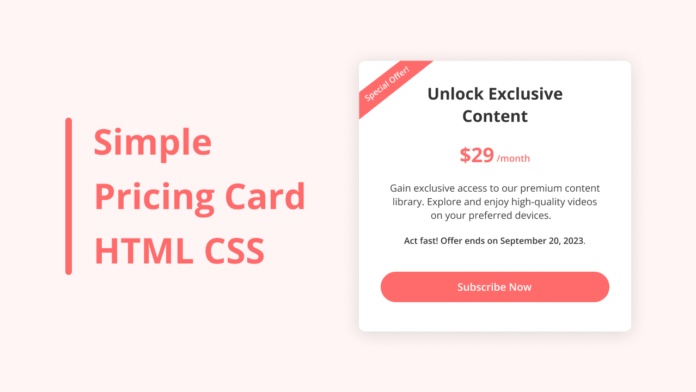
তো এই পোস্টে Pricing Card এর একটি Simple Code শেয়ার করবো। যা আপনি আপনার ওয়েবসাইট এর যেকোনো জিনিস Sell করার পেজ রাখতে পারেন।
তো চলুন শুরু করা যাক।
Live Demo

Code
সব কোড একসাথে .html এ Download করুন।
index.html
<!DOCTYPE html>
<html lang="en">
<head>
  <meta charset="UTF-8">
  <meta name="viewport" content="width=device-width, initial-scale=1.0">
  <title>Pricing Card HTML and CSS </title>
  <style> </style>
</head>
<body>
  <div class="container">
    <h2 class="title">Unlock Exclusive <br> Content</h2>
    <h3 class="price">$29<span>/month</span></h3>
    <p class="description">Gain exclusive access to our premium content library. Explore and enjoy high-quality videos on your preferred devices.</p>
    <b class="offer">Act fast! Offer ends on September 20, 2023.</b>
    <a class="subscribe-button" href="#">Subscribe Now</a>
    <div class="ribbon-wrap">
      <div class="ribbon">Special Offer!</div>
    </div>
  </div>
</body>
</html>
style.css
/* Importing Google font -Open+Sans */ @import url('https://fonts.googleapis.com/css2?family=Open+Sans:wght@300;400;500;600;700&display=swap'); * { margin: 0; padding: 0; box-sizing: border-box; font-family: 'Open Sans', sans-serif; } body { width: 100%; height: 100vh; background: #fff6f6; display: flex; justify-content: center; align-items: center; } .container { width: 460px; padding: 40px; background: #ffffff; text-align: center; border-radius: 12px; overflow: hidden; box-shadow: 0 0 15px rgba(0, 0, 0, 0.05); position: relative; } .container .title { font-size: 2rem; color: #333; } .container .price { color: #FF6B6B; font-weight: 700; font-size: 2.2rem; margin: 15px 0; } .container span { font-size: 1.2rem; } .container .description { color: #3b3b3b; font-size: 1.1rem; margin: 20px 0 20px; } .container .offer { display: block; color: #555; font-size: 1rem; margin-top: 25px; } .subscribe-button { display: inline-block; padding: 15px 0; background-color: #FF6B6B; color: #fff; text-decoration: none; border-radius: 30px; font-size: 1.2rem; margin-top: 40px; width: 100%; font-weight: 500; transition: 0.2s ease; } .subscribe-button:hover { background: #ff4d4d; } .ribbon-wrap { width: 150px; height: 150px; position: absolute; top: -10px; left: -10px; pointer-events: none; } .ribbon { width: 230px; font-size: 0.918rem; text-align: center; padding: 8px 0; background: #FF6B6B; color: #fff; position: absolute; transform: rotate(-45deg); right: -17px; top: 29%; }
আমি সব সময় কোডিং বিষয়ক পোস্ট করি তাই কোডিং নিয়ে কোনো কিছু লাগলে কমেন্ট এ বলবেন।
THE END
S
o friends, that’s it for today. See you in another post. If you like the post then like and comment. Stay tuned to Trickbd.com for any updates.
The post HTML CSS দিয়ে তৈরি করুন Simple Pricing Card! appeared first on Trickbd.com.
from
https://trickbd.com/web-development/3052610